环境配置
This section is a quick introduction to setting up and running the tooling. We’ll use the wire spec from the Conceptual Overview. 通过本文,读者可以快速配置并运行TLA+的工具。会用到概念概述这一章里讲过的wire规约。
Setting Up a Project - 配置工程
For teaching purposes, I like to start people off using the TLA+ IDE. It abstracts out some parts of TLA+ that can be difficult for beginners. You can download the most recent version of the Toolbox here. You will need Java for it to work. 处于教学目的,我会推荐人们一开始实用TLA+ IDE。它屏蔽了一些初学者可能难以理解的TLA+的一部分内容。你可以在这里下载工具箱的最新版本。电脑上需要有Java环境,它才能工作。
Once you have the toolbox, you’ll see an image like this: 工具箱界面大概是长这样式的:

Create a new specification under File > Open Spec > Add New Spec.
创建一个新的规约:File > Open Spec > Add New Spec。

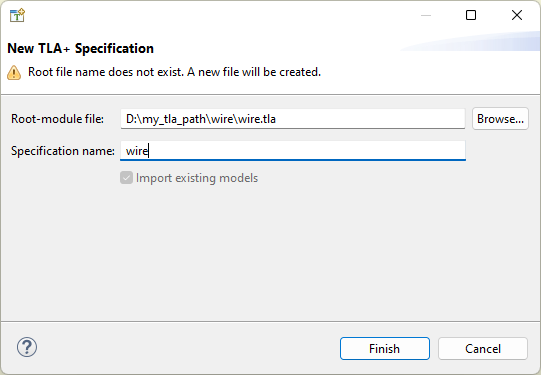
Once you do that, you should see something like this: 规约刚创建好的时候,文件是这样的:
For Historical Reasons, the MODULE $name must be surrounded by at least four dashes, the module must end with at least four equal-signs, and the $name of the module must match the filename (case sensitive). Everything above the module name and below the ==== is ignored, making those good places to store notes.
处于历史遗留原因,MODULE $name语句的两边必须至少有4个破折号,模块的结束必须有至少四个等号,而且模块的名字$name必须与文件名保持一致(大小写敏感)。模块名以上,四个等号以下的任何内容,都会被忽视,因此正好可以用来保存注释。
Let’s replace it with the contents of wire, so you get this: 把wire规约放进去:

(There should only be one MODULE row at the top and one ==== row at the bottom. Make sure to change the name of the module in the first line if you named your spec Wire.tla instead!)
(文件上面只能有一个MODULE 行,文件下面只能有一行等号。如果你要给规约文件重命名,记得修改第一行的模块名。)
Translating Specs - 翻译规约
As mentioned in the core outline, we’re going to be teaching pluscal. Translate it under File > Translate PlusCal Algorithm.
在核心模块的大纲中提到过,我们会首先讲PlusCal语言。这样翻译:File > Translate PlusCal Algorithm。

You can use the shortcut ctrl+T on Windows/Linux and cmd+T on Mac.
Once you do that, you should see this: 翻译后,文件变成了这样:

Running Models
To actually check this with TLC, we have to create a new model to check. Do that under TLC Model Checker > New Model.
为了使用TLC进行检查,需要创建一个新的模型来做检查:TLC Model Checker > New Model。
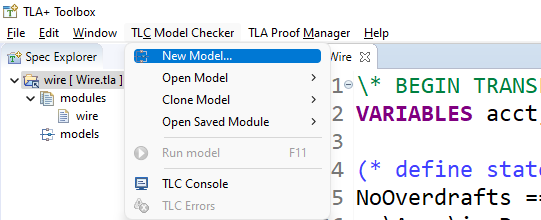
Once you do that, you should see this page: 创建完模型的界面:
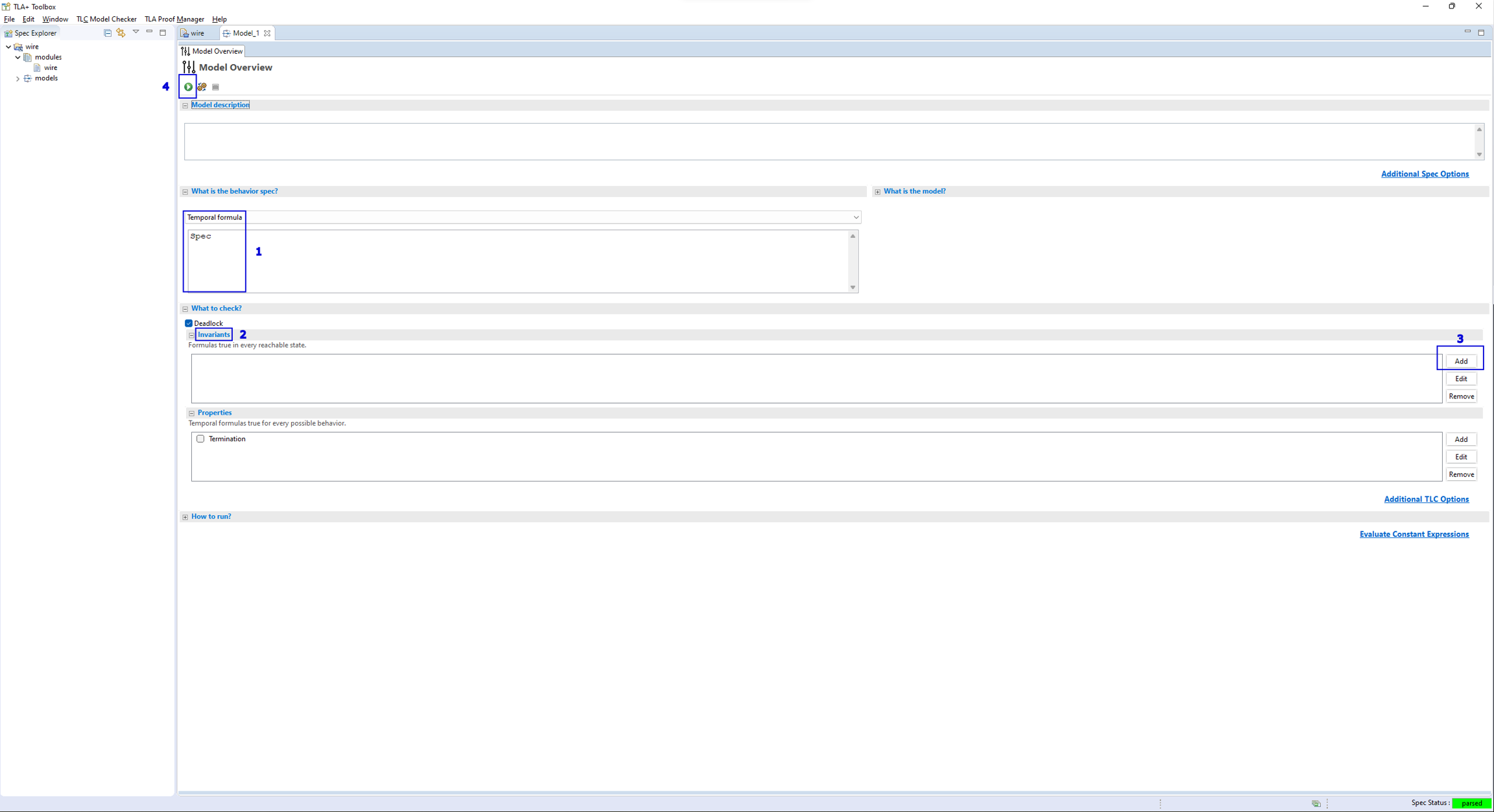
“What is the behavior spec” should be “Temporal Formula” and “Spec”. If it’s not, make sure you have only one set of
====in the spec, and the translated TLA+ is above it, then manually set the two fields.Click the “Invariants” box to open it up.
Click “Add”, and then insert the text
NoOverdrafts.Run the model, or press
F11.
When you run this, you will see an error pop up on the right side: 运行,啪,报错了:

This is an error trace, showing the exact set of steps that lead to an invariant being violated. We’ll talk about it a bit more when we get into invariants in depth. 这就是一个错误追踪。会展示出违反了不变量的步骤的集合。我们会在深入理解不变量中继续讨论这个话题。
Making a Scratchfile
I often like to test the outputs of operators without having to run the entire spec. To do that, I have a separate spec that I call “scratch”: 通常,我会在不执行完整规约的前提下,测试一部分操作的输出。这是通过一个独立的规约实现的,我称之为“刮痧”(不是:
This is different from a normal TLA+ file in two ways. First, instead of having “What is the behavior spec” set to “Temporal formula”, I have it set to “no behavior spec”. Second, on the “model checking results” page, I put Eval in the “Evaluate Constant Expression” box.
有两处与普通的TLA+文件不同。首先,What is the behavior spec设置为no behavior spec;其次,model checking results页面中,我在Evaluate Constant Expression框里写了个Eval。

Now whenever I run the model, the output of Eval will be placed in the “Value” box below. In this case, it will be 0. But if I change the Eval expression, I get something different.
现在无论何时执行这个模型,界面下面的Value框呈现的会是Eval 的值。在上面的例子中,结果是0。当我修改Eval 表达式的值,Value框就会随之更改。
Now running Eval will put “hello world!”.
现在执行Eval ,输出的是“hello world!”。
Having a scratchfile is very useful and I recommend setting one up. In the guide itself I will occasionally post “expression evaluations” like this 强力推荐创建一个这种文件,很使用。在这个教程中,我偶尔会说“表达式计算”,比如:
This just means that I set Eval == 1+1 and got 2 as the output. You can use this to check that you got the same results as me.
这个意思就是我设置了Eval == 1+1 ,得到输出 2 。你不信就自己试一试。
And with that, we’re ready to start learning TLA+! 好了,环境配置完成了,可以正式开始学习TLA+了。
Last updated